Imagine asking a warehouse robot to find “the damaged carton beside the blue pallet.” Qwen can connect that description to a region in the camera image, allowing the robot to look for more than a short, fixed list of object names.
1. What is Qwen?
A warehouse instruction often contains more than an object name. “Pick the damaged carton beside the blue pallet” includes an object, a property, and a relationship. A fixed detector may recognize carton, but it was not necessarily trained to reason about damaged, blue, or beside.
Qwen-VL approaches the problem as a vision-language model. It receives both the camera image and the instruction, then generates a response informed by both. When the response connects a phrase to an image region, the task is called visual grounding.
Grounding is more demanding than classification. Classification asks, “Is there a carton?” Grounding asks, “Which pixels correspond to the carton described by this particular phrase?” The surrounding words help distinguish the intended carton from other cartons in the same scene.
Qwen-VL is a generalist rather than a dedicated detector. The same model can describe an image, answer a question, read visible text, continue a dialogue, or produce a location. This breadth gives it semantic flexibility. It also means that localization is represented as generated language and coordinates, rather than through a fixed detection head built only for boxes.
1.1 See the Full Qwen-VL Pipeline
Image + prompt → grounded response
Position-aware visual tokens join the same generated sequence as language.
Read the diagram from top to bottom. Image and Text prompt enter together. The image passes through the Vision Transformer and Position-aware adapter before reaching the Qwen language model. The model combines those visual tokens with the prompt and produces a Grounded response containing language and locations.
1.2 Follow an Image and Prompt Through the Model
Follow the instruction the damaged carton beside the blue pallet through the model.
The diagram begins at Image. In the original Qwen-VL paper, the Vision Transformer acts as the visual receptor. It divides the image into patches and converts them into feature vectors. Each vector describes part of the image, but a high-resolution image can produce a long sequence of such features.
Next comes the Position-aware adapter. It creates a bridge between the vision model and the language model. A single cross-attention layer uses learned queries to gather the relevant visual information and compress the variable image sequence into 256 visual tokens. This step matters because the language model needs a compact visual representation without losing the spatial clues required for localization.
Finally, those visual tokens and the Text prompt enter the Qwen language model—Qwen-7B in the original paper. The language model processes them together and generates a response one token at a time. It can use words such as damaged and beside because those words participate in the same context as the image representation.
Boxes are made part of this generated language. The paper normalizes image coordinates to a 0–999 range and places them between special region tokens. During training, Qwen-VL sees examples that connect images, captions, and boxes. It gradually learns that a phrase can be followed by coordinates describing the corresponding region.
The final box in the diagram is the Grounded response. Some generated tokens describe the object and others encode its location. There is no separate fixed-class detection head at the end.
1.3 How Qwen-VL Learns Language and Location
Qwen-VL’s central innovation is to make localization part of a general multimodal conversation. The position-aware adapter compresses image features while retaining the spatial information needed to point back into the image. The unified input–output format lets words, images, and boxes participate in one sequence.
The model learns this ability in stages. Large-scale image–text pre-training first teaches broad visual concepts while the language model remains frozen. Multi-task pre-training then uses higher-resolution images and trains all components together on a wider mixture of tasks, including grounding and text reading. Supervised instruction tuning finally produces Qwen-VL-Chat, which learns to follow conversational instructions.
The order matters. The model first learns what visual content looks like, then learns to solve specific multimodal tasks, and finally learns to respond helpfully to instructions. Grounding is therefore connected to the model’s wider language and visual knowledge rather than trained as an isolated output.
1.4 Why Qwen-VL Generates One Token at a Time
Because the response is generated as a sequence, each new token depends on the image, the prompt, and the tokens already produced. Let be the image, the text prompt, and the token generated at step . The conditional output distribution is
The equation says that the model builds its answer step by step. Some tokens describe the object; others encode its location. A dedicated detector instead predicts class scores and box vectors directly and in parallel.
This difference explains the practical trade-offs:
- Wording can change localization because text is part of the conditioning context.
- The model can use broad semantic knowledge unavailable to a small fixed-class head.
- Output validation is essential because generative models can produce plausible but unsupported answers.
- Latency and determinism may differ from specialized detectors.
For a robot, Qwen is most useful when language carries information that a fixed class label would lose. Its output should still be treated as a hypothesis. Before acting, the system must validate the returned region, connect it to depth or segmentation, and check whether the proposed action is geometrically and physically safe.
2. How to Use Qwen in the Telekinesis Agentic OS
Telekinesis provides Qwen grounding as the Retina Skill detect_objects_using_qwen. The code below loads an image, requests three object names, and prints the normalized categories, scores, and boxes returned by the Skill.
from telekinesis import datatypes, retina

image = datatypes.Image.from_url(
    url="https://assets.telekinesis.ai/examples/v1/images/warehouse_1.jpg"
)

detections, categories = retina.detect_objects_using_qwen(
    image=image,
    objects=["person", "forklift", "pallet"],
)

for detection in detections:
    label = categories[detection.category_id]
    print(label.name, detection.score, detection.bbox)
The visualization below shows the grounded output rather than free-form model prose. Inspect whether every requested concept is supported by visible evidence, especially on negative scenes and ambiguous prompts.
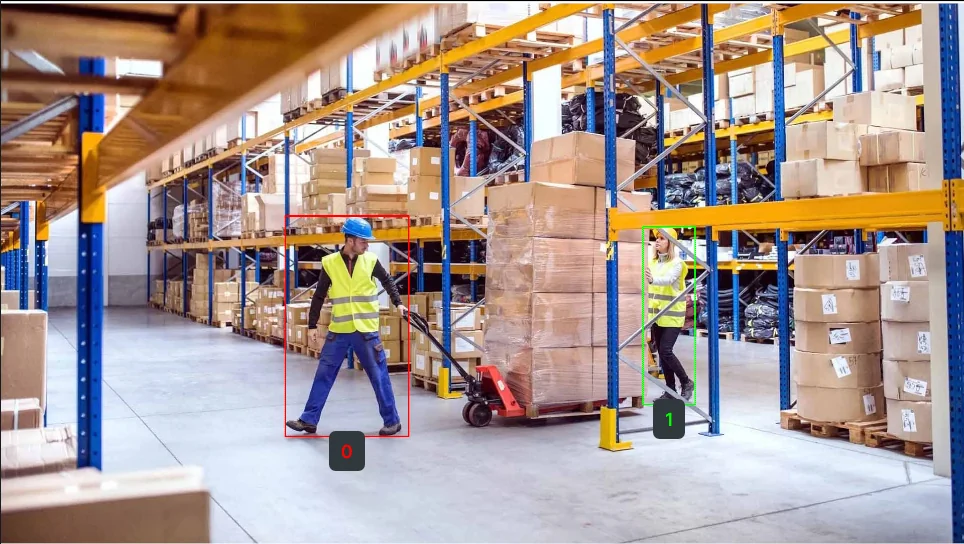
Qwen uses multimodal understanding to localize requested names. Treat the boxes as hypotheses to validate against task geometry and negative scenes.
3. Benchmarking
3.1 Results Reported in the Qwen-VL Paper
The Qwen-VL paper evaluates referring-expression comprehension as localization accuracy. The abbreviated table below reports selected validation/test results from Table 6; it describes the original Qwen-VL checkpoints, not necessarily the current hosted service version.
| Model | RefCOCO val | RefCOCO test-A | RefCOCO test-B | RefCOCO+ val | RefCOCOg val |
|---|---|---|---|---|---|
| Shikra-13B | 87.83 | 91.11 | 81.81 | 82.89 | 82.64 |
| Qwen-VL-7B | 89.36 | 92.26 | 85.34 | 83.12 | 85.58 |
| Qwen-VL-7B-Chat | 88.55 | 92.27 | 84.51 | 82.82 | 85.96 |
| Grounding DINO-L | 90.56 | 93.19 | 88.24 | 82.75 | 86.13 |
RefCOCO results cannot predict warehouse performance by themselves. Build a prompt-by-scene test set and report localization success at an IoU tolerance, hallucination rate on negative images, end-to-end latency, and final robot-task success.
3.2 Comparison with Other Telekinesis Skills
| Skill | Query | Threshold control | Strongest reason to choose it |
|---|---|---|---|
| Qwen | List of object names | No exposed tuning threshold | Semantic and multimodal flexibility |
| Grounding DINO | Phrase prompt | Box and text thresholds | Direct open-vocabulary grounding control |
| RF-DETR | COCO class set | Score threshold | End-to-end fixed-vocabulary detector |
| YOLOX | COCO class set | Score and NMS thresholds | Efficient dense detector with explicit NMS |
4. Where to Go Next?
Study Grounding DINO for an open-vocabulary detector with separate localization and text-alignment thresholds. For fixed COCO classes, compare RF-DETR and YOLOX.
5. References
- Bai, J. et al. “Qwen-VL: A Versatile Vision-Language Model for Understanding, Localization, Text Reading, and Beyond”, 2023.
- Wang, P. et al. “Qwen2-VL: Enhancing Vision-Language Model’s Perception of the World at Any Resolution”, 2024.
- Liu, S. et al. “Grounding DINO: Marrying DINO with Grounded Pre-Training for Open-Set Object Detection”, 2023.
- Telekinesis. “Detect Objects Using QWEN”, Retina Skill documentation.