Imagine telling a robot, “Find the red emergency-stop button.” With Grounding DINO, you can describe what the robot should look for in ordinary words—even when that exact object was not one of the detector’s original class labels.
1. What is Grounding DINO?
Imagine commissioning a warehouse robot with a detector trained to recognize person, forklift, and box. A new task arrives: find a carton with torn wrapping. The camera can see it, and a human can describe it, but the detector has no class called “carton with torn wrapping.” Adding that class normally means collecting images, drawing labels, and training again.
Grounding DINO changes the interface. Instead of asking only, “Which trained class is this?”, it also asks, “Which region matches these words?” You supply an image and a phrase such as carton with torn wrapping, and the model returns boxes aligned with that phrase.
This is why Grounding DINO is called an open-set, language-conditioned object detector. Open-set means the request is not limited to one small list of class IDs. Language-conditioned means the text changes what the detector searches for.
That is useful in mixed-SKU logistics, flexible assembly, inspection, laboratory automation, and human-directed manipulation—settings where the robot’s vocabulary changes faster than a dedicated detector can be retrained.
The result is still only a 2D hypothesis. A box aligned with red emergency-stop button does not provide depth, a surface mask, a 6D pose, or a safe grasp. Grounding DINO helps the robot decide where to look next; later perception and planning stages decide what the robot can safely do there.
1.1 See the Full Grounding DINO Pipeline
Image + language → grounded boxes
Language enters the detector at feature fusion, query initialization, and decoding.
Read the diagram from top to bottom. Image and Text prompt enter together. They pass through Visual + text encoders, the Feature enhancer, Query selection, and the Cross-modal decoder. The final Grounded detections contain boxes paired with phrases.
The name is also a map of the design. DINO contributes the transformer detector, which represents possible objects with queries and predicts a set of boxes. Grounding connects those possible objects to words and phrases.
1.2 Follow an Image and Prompt Through the Model
Follow the prompt red emergency-stop button through the architecture.
The diagram begins at Image. It enters a Swin Transformer, the visual half of Visual + text encoders. Rather than producing a class name, this encoder produces feature maps: numerical descriptions of visual patterns at several scales. Fine-scale features help preserve small details, while coarser features provide wider scene context.
At the same time, Text prompt enters BERT, the text half of Visual + text encoders. BERT produces a feature for each text token, but those features are contextual. The representation of “red” is influenced by “button,” so the model is not searching independently for redness and button-like objects.
The architecture described by Liu et al. joins the visual and textual streams in three connected stages:
- The Feature enhancer lets the image and text representations exchange information. After this stage, an image location can already be interpreted in relation to the request.
- Query selection searches those enhanced image features for language-relevant regions. The strongest locations become initial object queries—the candidates the decoder will investigate further.
- The Cross-modal decoder repeatedly refines each query. It adjusts the candidate box while consulting both the image features and the text features.
The last box in the diagram is Grounded detections. Each result joins the refined image box with the phrase or tokens that best match it.
The stages form one chain. Text first changes how the visual features are interpreted; those features determine which candidates are selected; the decoder then improves those candidates. The model is therefore answering two questions together: “Is there an object-like region here?” and “Does it match the supplied words?”
A simplified equation makes the matching idea concrete. Let represent a candidate image location and represent a text token. Their compatibility can be pictured as
If the two learned representations point in similar directions, the score is high. The real model is richer than this single dot product because both features already contain context and have interacted in the feature enhancer. Still, the equation captures the intuition: candidate regions rise when their visual meaning aligns with the requested language.
This differs from a fixed classifier. A fixed detector compares a region against a stored weight vector for each trained class. Grounding DINO compares regions with the text supplied for the current image, then returns token-level alignments alongside its boxes.
1.3 Why Grounding DINO Works Differently
The key innovation is not simply attaching a text encoder to the end of a detector. Grounding DINO introduces language during feature enhancement, query selection, and box decoding. The paper calls this tight fusion because language participates throughout the detection process.
The model also needs to handle prompts containing several categories. If button, pallet, and carton are placed in one sequence, they should not blur into one compound concept. Sub-sentence attention masks limit unwanted attention between separate category phrases.
Finally, grounded pre-training supplies the experience that makes the interface work. The model learns from image regions paired with language, so it can transfer region–phrase alignment to novel categories and referring expressions. Architecture creates the path between vision and language; pre-training teaches that path useful associations.
1.4 When Should You Use Grounding DINO?
| Detector type | Inference query | Best fit | Main constraint |
|---|---|---|---|
| Classical geometry | Radius, contour, colour | Controlled geometry | No semantic vocabulary |
| Fixed detector | Trained class IDs | Fast repeated classes | Retraining for new classes |
| Grounding DINO | Names or phrases | Open-vocabulary localization | Prompt and threshold sensitivity |
| Qwen detector | Natural-language object list | Semantic flexibility | Generative behavior and latency |
The table shows where Grounding DINO sits. It offers far more vocabulary flexibility than a fixed detector, while remaining more detection-focused than a general vision-language model. The trade-off is that results depend on how the target is phrased and how confidently the model aligns that phrase with the image.
2. How to Use Grounding DINO in the Telekinesis Agentic OS
Telekinesis provides Grounding DINO as the Retina Skill detect_objects_using_grounding_dino. The code below loads an image, searches for cartons and pallets, applies separate box and text thresholds, and prints the typed detections.
from telekinesis import datatypes, retina

image = datatypes.Image.from_url(
    url="https://assets.telekinesis.ai/examples/v1/images/palletizing.jpg"
)

detections, categories = retina.detect_objects_using_grounding_dino(
    image=image,
    objects=["carton", "wooden pallet"],
    box_threshold=0.45,
    text_threshold=0.50,
)

for detection in detections:
    category = categories[detection.category_id]
    print(category.name, detection.score, detection.bbox)

print("boxes [x, y, w, h]:", detections.bboxes)
print("scores:", detections.scores)
print("category IDs:", detections.category_ids)

if len(detections) == 0:
    print("No target: stop, reobserve, or request clarification")
The Skill returns detections alongside the prompt-derived category table. The rendered result below makes the contract tangible: each phrase is resolved into a category, score, and image-space bounding box that downstream code can inspect.
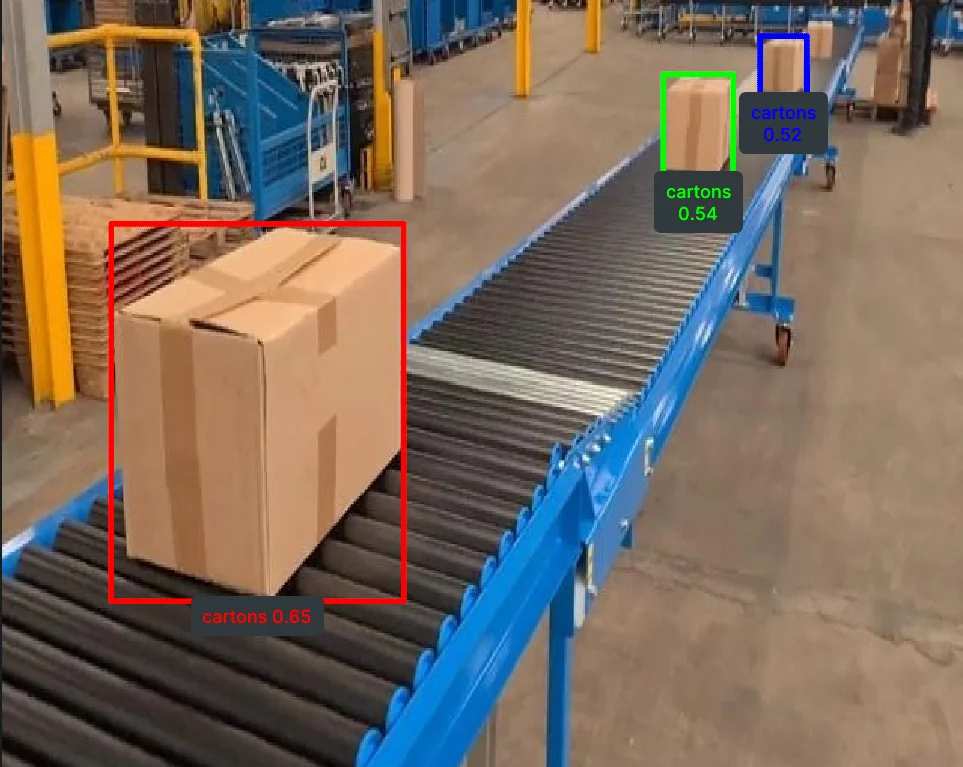
Grounding DINO converts the supplied object vocabulary into localized image regions. The visualization is evidence about 2D grounding—not yet about depth, reachability, or grasp safety.
3. Benchmarking
3.1 Results Reported in the Grounding DINO Paper
These are zero-shot COCO 2017 validation results from Table 2 of the Grounding DINO paper. “Zero-shot” means the COCO training split was not used for that row; pre-training data and backbone still differ.
| Model | Backbone | Pre-training data | COCO AP |
|---|---|---|---|
| GLIP-T (C) | Swin-T | O365, GoldG | 46.7 |
| Grounding DINO-T | Swin-T | O365, GoldG | 48.1 |
| Grounding DINO-T | Swin-T | O365, GoldG, Cap4M | 48.4 |
| GLIP-L | Swin-L | FourODs, GoldG, Cap24M | 49.8 |
| Grounding DINO-L | Swin-L | O365, OpenImages, GoldG | 52.5 |
Paper AP is evidence about the evaluated checkpoints—not a benchmark of the Telekinesis-hosted artifact, network path, or your robot images. Measure end-to-end latency and task accuracy in the deployed Agentic OS pipeline.
3.2 Comparison with Other Telekinesis Skills
| Skill | Vocabulary | Main controls | Prefer it when |
|---|---|---|---|
| Grounding DINO | Open text phrases | Box and text thresholds | New categories and referring phrases |
| Qwen | Requested object names | Object list | Broad semantic interpretation matters |
| RF-DETR | Fixed COCO-80 | Score threshold | Fixed common classes and transformer detection |
| YOLOX | Fixed COCO-80 | Score and NMS thresholds | Fast dense detection and explicit suppression control |
| Contours/Hough | Geometric priors | Shape-specific parameters | The scene is controlled and geometry is the signal |
4. Where to Go Next?
Use Qwen when the request benefits from broader multimodal reasoning. Compare RF-DETR and YOLOX when the target belongs to COCO and predictable fixed-vocabulary detection is preferable.
Use Grounding DINO when vocabulary flexibility and explicit threshold control both matter. Use Qwen when richer vision-language interpretation and a simpler object-name interface matter more than threshold access. Use RF-DETR or YOLOX when the target belongs to a stable class set and predictable latency and calibration are more valuable than open vocabulary.
An effective deployment may cascade them: use language grounding to nominate a class or region, then use a specialized detector or segmenter for precise repeated operation.
5. References
- Liu, S. et al. “Grounding DINO: Marrying DINO with Grounded Pre-Training for Open-Set Object Detection”, 2023.
- Zhang, H. et al. “DINO: DETR with Improved DeNoising Anchor Boxes for End-to-End Object Detection”, ICLR 2023.
- Carion, N. et al. “End-to-End Object Detection with Transformers”, ECCV 2020.
- Telekinesis. “Detect Objects Using Grounding DINO”, Retina Skill documentation.