Imagine a robot sorting identical cylinders on a conveyor where the target part is always painted the same red and the illumination never changes. A learned model may work, but the simplest reliable rule may be: keep pixels whose red, green, and blue values fall inside a measured range.
1. What is RGB Color Segmentation?
RGB color segmentation is a deterministic algorithm that labels pixels by testing whether their red, green, and blue channel values lie inside chosen bounds. It solves a narrow but common robotics problem: separating an object from its background when raw camera color is the distinguishing signal and the imaging conditions are controlled.
Unlike SAM 3 or BiRefNet, RGB thresholding does not learn what an object looks like. It has no model weights, training dataset, or semantic vocabulary. It simply evaluates the same transparent rule for every pixel. That makes it fast, inspectable, and easy to validate—but only as robust as the color range and lighting setup.
1.1 The Complete RGB Segmentation Path
Raw channel bounds → binary mask
RGB thresholding is transparent and fast, but brightness changes move all three channel values and can move the target outside the box.
An RGB camera gives every pixel three numbers: how much red, green, and blue the encoded image contains at that location. RGB segmentation turns those numbers into a yes-or-no decision by defining an acceptable range for each channel.
For one pixel, the algorithm first checks the red value, then the green value, and then the blue value. The pixel becomes foreground only when all three values lie inside their respective ranges. Repeating the test across the image creates the binary mask.
A geometric picture makes the rule easier to understand. Imagine every possible RGB color as a point inside a cube. The lower and upper bounds draw a smaller rectangular box inside it. Target pixels are the points that land inside this box; all other colors land outside.
This simplicity is also the limitation. The rule knows nothing about objects or neighboring pixels, and brightness changes often move all three channel values together. The interactive view shows the accepted color region before the next sections explain the channel values and threshold equation.
Interactive color coordinates
Describe the same pixel in four color spaces
1.2 What an RGB Pixel Represents
For an eight-bit image, a pixel is a vector
Here, , , and are the stored red, green, and blue channel values. They describe the camera’s encoded response, not an intrinsic material property. Exposure, illumination spectrum, reflections, white balance, and sensor processing can all change them.
A bright red painted part may yield under one lamp and under a dimmer exposure. Both look red because red remains dominant, but a narrow raw RGB range may accept one and reject the other. This coupling of color and brightness is RGB thresholding’s central limitation.
1.3 The Per-Pixel Decision Rule
Let the lower bound be and the upper bound be . The output mask at pixel location is
Here, , , and are the channels at image coordinate ; is the binary output label; and means every channel test must be true.
The rule explains how tuning behaves. Wider bounds improve recall because they admit more variations of the target color, but they also admit more background. Narrow bounds improve precision until normal variation in the target begins to disappear.
1.4 From Individual Pixels to Useful Robot Geometry
Thresholding knows nothing about connected objects. Dust, glare, and another red item all become foreground if their channel values pass. A useful pipeline usually follows the mask with morphological opening or closing, connected-component labeling, contour extraction, and an area filter.
Suppose the conveyor mask contains one large cylinder region and twenty isolated noise pixels. Connected components turn those foreground pixels into separate regions. An area threshold can reject the tiny regions. A contour or centroid then produces geometry that the robot can measure.
The coordinates remain pixels. Converting a mask centroid into a pick point still requires depth or a known work plane, camera calibration, and a transform into the robot base frame.
1.5 Why RGB Thresholding Has No Loss Function
A loss function measures prediction error while a learned model is being trained. RGB thresholding has no training loop: engineers choose the bounds, and the rule is executed directly. Claiming that it was trained on a dataset would therefore be incorrect.
You can still optimize it empirically. Given annotated validation masks, measure intersection over union
where is the predicted foreground set, is the ground-truth set, and vertical bars denote pixel count. Search candidate bounds on a calibration set, then report performance on different held-out images. This is parameter selection, not model training.
1.6 When Should You Use RGB Segmentation?
| Situation | RGB thresholding fit |
|---|---|
| Fixed camera, fixed exposure, controlled lights | Strong |
| Distinctive painted target and neutral background | Strong |
| Sunlight, shadows, or automatic exposure | Weak |
| Target and background share color | Weak |
| Target identity depends on shape or semantics | Wrong signal |
RGB is often the best first baseline in an engineered cell because failures are easy to explain. If brightness varies but hue stays meaningful, move to HSV. If thresholds should correspond more closely to perceived color differences, compare LAB. If color cannot identify the target, use a semantic model.
1.7 How to Choose Bounds From Real Images
Avoid selecting bounds from one pixel in one frame. Capture a small calibration set spanning the normal part positions, light warm-up period, camera exposure, and surface orientations. Draw regions inside the target and background, then inspect each channel’s distribution.
For a target channel, a low percentile and high percentile are often safer starting points than the absolute minimum and maximum. Extreme samples may be glare, sensor noise, or incorrectly selected background. Suppose 98% of valid red-part samples have , , and . Those intervals define a candidate box, but the background distribution must be checked too. If a wooden fixture occupies the same box, no amount of small threshold tuning will reliably separate the two materials.
Split the captured images into a tuning set and a test set. Choose bounds on the tuning images, freeze them, and then measure the test images. Reusing the same pixels for both steps hides overfitting even though the algorithm itself is not learned.
1.8 Make the Imaging Setup Part of the Algorithm
In production vision, lighting is not merely environmental context; it is part of the measurement system. Diffuse lights reduce specular highlights. A shroud blocks sunlight. Manual exposure and white balance prevent the camera from silently changing channel values when a new object enters the frame. A color reference can reveal slow drift.
This engineering often matters more than changing algorithms. If the target’s RGB cluster is compact and separate under controlled illumination, a simple threshold can outperform a sophisticated model in speed, explainability, and maintenance. If the cluster moves unpredictably despite reasonable controls, the scene is telling you that raw RGB is the wrong representation.
1.9 Read Failure Shapes, Not Just Scores
The shape of an error often reveals its source:
- A target disappears uniformly when the lights dim: all channel bounds are too coupled to brightness.
- Only glossy regions disappear: highlights have moved the surface color toward the illuminant.
- Background patches appear consistently: their material genuinely shares the accepted RGB range.
- Isolated speckles appear: sensor noise or texture needs spatial filtering after thresholding.
- The mask changes between identical frames: automatic camera controls may still be active.
This diagnostic transparency is one of classical vision’s strengths. Every foreground pixel has a direct reason for being selected, so an engineer can trace a failure back to channel values, bounds, or imaging conditions.
2. How to Use RGB Segmentation in the Telekinesis Agentic OS
Telekinesis provides RGB thresholding as the Cornea Skill segment_image_using_rgb. The code loads a conveyor image and keeps only pixels inside the inclusive RGB range.
from telekinesis import cornea, datatypes

image = datatypes.Image.from_url(
    url="https://assets.telekinesis.ai/examples/v1/images/cylinder_on_conveyor.jpg"
)

mask = cornea.segment_image_using_rgb(
    image=image,
    lower_bound=(0, 50, 50),
    upper_bound=(180, 255, 255),
)

print(mask.shape, mask.label_codes, mask.number_of_labels)
The returned SegmentationImage uses label 0 outside the range and label 1 inside it. Inspect the result across normal exposure variation before relying on the mask downstream.
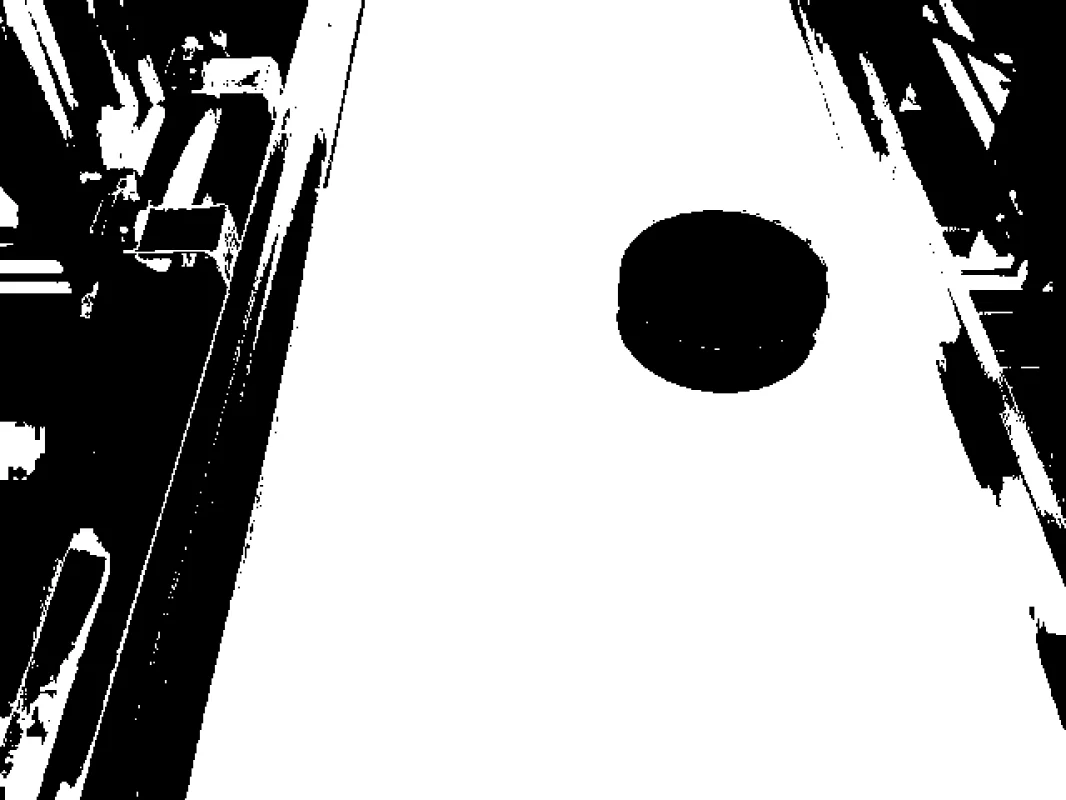
Every selected pixel passed all three channel tests; the algorithm does not know whether those pixels belong to the intended physical object.
3. Benchmarking
RGB thresholding has no paper checkpoint or universal accuracy number. Benchmark it on the deployed camera using pixel precision, recall, IoU, connected-component count, centroid error, and latency. Include bright, dark, reflective, dirty, and absent-target scenes; a perfect mask on one carefully chosen image proves very little.
4. Where to Go Next?
 Basic · 8 min read
What is HSV Color Segmentation?
HSV color segmentation solves the problem of selecting pixels by color while separating hue from brightness. Learn the RGB-to-HSV mechanism, circular hue thresholds, practical failure modes, and how to use it in the Telekinesis Agentic OS.
Read tutorial → Basic · 8 min read
What is LAB Color Segmentation?
LAB color segmentation solves the problem of selecting pixels with bounds that better reflect perceived lightness and color differences. Learn the CIELAB conversion, opponent channels, threshold geometry, and how to use it in the Telekinesis Agentic OS.
Read tutorial →5. References
- IEC. “IEC 61966-2-1: Multimedia systems and equipment—Colour measurement and management—Part 2-1: Default RGB colour space—sRGB”, 1999.
- Telekinesis. “Segment Image Using RGB”, Cornea Skill documentation.