Imagine a robot tracing a blue wire while the workbench becomes brighter near a lamp and darker under the robot arm. The blue pixels change in RGB, but their dominant color can remain recognizably blue. HSV makes that distinction explicit by separating color from brightness.
1. What is HSV Color Segmentation?
HSV color segmentation is a deterministic algorithm that converts pixels into hue, saturation, and value, then keeps those inside chosen bounds. It solves color-selection tasks where illumination intensity varies enough to make raw RGB thresholds brittle but the target hue remains distinctive.
HSV does not recognize objects and is not trained on a dataset. It changes the coordinate system in which the same pixel is described. That coordinate change makes some engineering rules easier to express: keep blue hues, reject nearly gray pixels, and tolerate a wide brightness range.
1.1 The Complete HSV Segmentation Path
RGB → hue, saturation, value → mask
Hue can remain useful as brightness changes, but it becomes unstable when saturation is low and the pixel is nearly gray.
The camera still begins with red, green, and blue values. HSV segmentation first changes the coordinate system used to describe those same colors. It does not capture new information; it reorganizes the existing values around properties that are often easier to name and threshold.
After conversion, hue describes the color family around a circular color wheel. Saturation says how far the pixel is from gray, and value records its brightness. A blue cable can therefore be described as “blue hue, enough saturation to reject gray metal, and a broad value range that allows some shadow.”
The algorithm applies those three bounds to every converted pixel. A pixel becomes foreground only when its hue, saturation, and value all pass. Repeating this decision builds the mask.
The conversion makes the engineering rule more intuitive, but it does not remove lighting problems. Hue becomes unreliable near gray, and a colored lamp can shift the apparent hue itself. The interactive diagram introduces the coordinates before we derive how RGB becomes HSV.
Interactive color coordinates
Describe the same pixel in four color spaces
1.2 How RGB Becomes Hue, Saturation, and Value
Normalize red, green, and blue into . Define
Here, and are the largest and smallest channel values, and is their spread. Value is . Saturation is
Hue is determined by which channel is largest and by the relative differences between channels. The exact piecewise formula places the result around a color circle: red near , green near , and blue near .
The geometry explains the benefit. Multiplying all RGB channels by a similar brightness factor changes strongly while often changing much less. The hue range can stay tight while the value range remains broad.
1.3 Hue Is Circular, Not a Straight Line
Hue wraps around. Red lives at both ends of a conventional to scale. OpenCV-style eight-bit HSV stores hue on , so a red target may require two intervals—one near 0 and another near 180—whose masks are combined.
This is not an implementation nuisance; it follows from color-circle geometry. A single linear interval works naturally for colors away from the wrap point, such as blue. Red crosses the numerical seam even though it occupies one continuous perceptual neighborhood.
1.4 Why Saturation Protects the Hue Test
Hue becomes unstable when is small. For a gray pixel, red, green, and blue are nearly equal, so there is no meaningful dominant color. Tiny sensor noise can swing the computed hue even though the pixel still looks gray.
A lower saturation bound rejects these unreliable pixels. Likewise, a lower value bound can reject very dark pixels whose color is dominated by noise. This produces a common HSV rule: constrain hue fairly tightly, then use saturation and value thresholds to decide when that hue should be trusted.
1.5 The Thresholding Rule
For lower bound and upper bound , a pixel becomes foreground only when
, , and are the converted pixel channels. Each lower and upper symbol defines the accepted range on its corresponding channel. All conditions must hold.
HSV improves separation of chromaticity and brightness; it does not create illumination invariance. Colored light changes hue. Specular highlights lower saturation. Shadows can distort camera channels, and automatic white balance moves colors between frames. Stable lighting and locked camera settings still improve results.
1.6 Why HSV Has No Training Loss
HSV conversion and range comparison are fixed mathematics, so there is no learned parameter vector and no training loss. Engineers tune bounds from sampled pixels or a labeled calibration set.
Use held-out masks to measure IoU, precision, and recall. Also measure connected-component stability: a mask with good overall IoU can still split one wire into several fragments, which may break path planning. Testing should represent the full expected illumination range rather than only the nominal setup.
1.7 Choosing Between RGB, HSV, and LAB
| Space | Coordinates emphasize | Useful when | Main caution |
|---|---|---|---|
| RGB | Raw camera channels | Lighting and exposure are fixed | Brightness and color are coupled |
| HSV | Hue, vividness, brightness | Hue remains distinctive as intensity varies | Hue is unstable near gray |
| LAB | Lightness and opponent colors | Perceptual color distance matters | Conversion and white point still matter |
The correct space is empirical. Sample the target and background across real operating conditions, plot their distributions, and choose the representation that separates them with the simplest stable boundary.
1.8 How to Choose HSV Bounds Systematically
Start by sampling pixels from the target across several frames. Plot hue only for pixels whose saturation and value are high enough to make hue meaningful. A histogram should reveal whether the target occupies one compact hue interval or crosses the red wrap-around boundary.
Next, inspect false positives. If gray metal enters the mask, raise the saturation lower bound. If dark background noise enters it, raise the value lower bound. If valid shaded target pixels disappear, the value lower bound may be too high. Change one bound at a time so the consequence remains interpretable.
Do not choose a hue interval only from its human color name. Camera spectral sensitivity and white balance affect the measured hue. “Blue” paint under your camera may occupy a different numerical range from a web color picker. The deployed camera is the measuring instrument, so use its pixels.
1.9 What Happens at Shadows and Highlights
A shadow often lowers value while leaving hue reasonably stable, which is exactly where HSV helps. But the approximation breaks down under colored illumination and near sensor saturation. A specular highlight reflects the lamp more strongly than the surface pigment, pulling saturation downward and sometimes shifting hue. A deep shadow contains few photons, so channel noise makes hue unreliable.
This yields a useful mental model: hue is robust to moderate intensity scaling, not to every physical change in image formation. HSV rearranges camera measurements; it does not estimate surface reflectance.
1.10 Turn the Pixel Mask Into a Reliable Detection
The raw HSV mask is usually an intermediate representation. Morphological closing can bridge small gaps in a wire. Opening can remove isolated pixels. Connected components can separate individual regions, and area or elongation filters can reject implausible shapes.
Each spatial operation should follow the physical task. A large closing kernel may join two nearby wires. A minimum-area filter may remove the far end of a perspective scene. Validate the complete pipeline rather than celebrating a visually attractive threshold mask in isolation.
Once a region is stable, calculate its contour, centroid, or principal axis. Those remain image coordinates until camera calibration and depth or a known plane connect them to metric robot coordinates.
2. How to Use HSV Segmentation in the Telekinesis Agentic OS
Telekinesis provides HSV thresholding as the Cornea Skill segment_image_using_hsv. The code converts a wire image internally and returns the pixels inside the inclusive HSV range.
from telekinesis import cornea, datatypes

image = datatypes.Image.from_url(
    url="https://assets.telekinesis.ai/examples/v1/images/wires_rgb.png"
)

mask = cornea.segment_image_using_hsv(
    image=image,
    lower_bound=(0, 50, 50),
    upper_bound=(180, 255, 255),
)

print(mask.shape, mask.label_codes, mask.number_of_labels)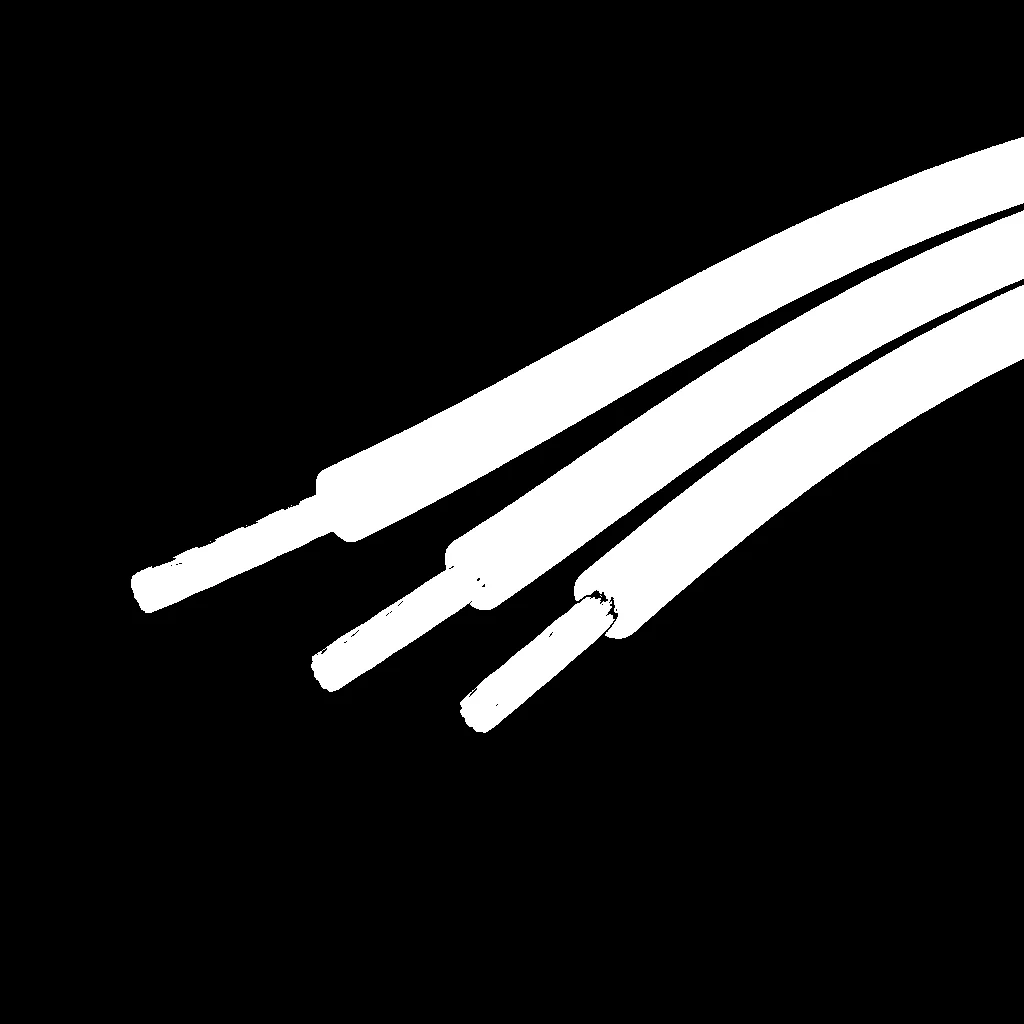
The mask is the intersection of hue, saturation, and value tests. It identifies a color range, not an object identity.
3. Benchmarking
There is no universal HSV benchmark because performance is determined by the chosen bounds, camera, target colors, and lighting. Report pixel precision, recall, IoU, component fragmentation, centroid error, and latency across the darkest and brightest valid scenes. Compare against RGB and LAB using the same frames and annotations.
4. Where to Go Next?
 Basic · 8 min read
What is RGB Color Segmentation?
RGB color segmentation solves the problem of separating pixels with known raw color values under controlled lighting. Learn its channel-thresholding mechanism, mathematical decision rule, engineering limits, and how to use it in the Telekinesis Agentic OS.
Read tutorial → Basic · 8 min read
What is LAB Color Segmentation?
LAB color segmentation solves the problem of selecting pixels with bounds that better reflect perceived lightness and color differences. Learn the CIELAB conversion, opponent channels, threshold geometry, and how to use it in the Telekinesis Agentic OS.
Read tutorial →5. References
- Smith, A. R. “Color Gamut Transform Pairs”, Computer Graphics, 1978.
- Telekinesis. “Segment Image Using HSV”, Cornea Skill documentation.