Imagine a collaborative robot that needs a coarse hand-region mask before running a more expensive safety or pose model. The person may move between bright and shadowed parts of the workcell. Raw RGB values move with that brightness, but the relationship between red, blue, and overall luma can remain more stable. YCrCb exposes those relationships as separate channels.
1. What is YCrCb Segmentation?
YCrCb color segmentation is a deterministic algorithm that converts RGB pixels into luma and two color-difference channels, then selects pixels inside chosen bounds. It solves color-range tasks where chrominance should be tested somewhat independently of brightness—most famously coarse skin-tone segmentation.
The name describes the coordinates. Y is luma, a weighted brightness-like signal computed from gamma-encoded color channels. Cr measures how red differs from luma, and Cb measures how blue differs from luma. In many libraries the neutral point of Cr and Cb is shifted near 128 so all three channels fit into unsigned eight-bit storage.
YCrCb is not an object-recognition model. A wooden surface, cardboard, or warm-colored wall can share the same chrominance range as skin. The algorithm labels colors, not people or hands. That distinction must remain visible in any robotics safety argument.
1.1 The Complete YCrCb Segmentation Path
RGB → luma + color differences → mask
Keeping the Y range broad lets Cr and Cb select chrominance while tolerating moderate brightness changes.
The camera image again begins in RGB, where brightness and color are mixed across three channels. YCrCb conversion reorganizes each pixel into one luma value and two color-difference values. Luma carries much of the light–dark variation, while Cr and Cb describe how red-like or blue-like the color is relative to that luma.
This separation lets the engineer express a rule such as “accept this chrominance across a fairly wide brightness range.” The algorithm converts every pixel, checks its Y, Cr, and Cb values against the supplied bounds, and marks it as foreground only when all three tests pass.
Mechanically, this is still a rectangular threshold like RGB segmentation. The important difference is the coordinate system: a simple box in YCrCb corresponds to a different, often more useful, region of colors when mapped back to RGB.
The conversion cannot tell what an object is, and different materials can share similar chrominance. The interactive view shows the three coordinates before the following sections explain their calculation and their practical limits.
Interactive color coordinates
Describe the same pixel in four color spaces
1.2 Y Is Luma, Not Physical Luminance
The prime in formal notation, , matters. YCrCb is normally derived from nonlinear, gamma-encoded values used in digital video—not directly from linear-light energy. For a BT.601-style normalized transform, luma is approximated by
Here, , , and are gamma-encoded red, green, and blue components, and is the encoded luma. Green receives the largest coefficient because the luma signal is designed to track visual brightness sensitivity more closely than a simple channel average.
Calling Y “brightness” is a useful engineering shorthand. Calling it physical luminance is not exact. Physical luminance is a linear-light photometric quantity, while luma belongs to an encoded video signal.
1.3 Cr and Cb Describe Color Differences
Once luma is known, chrominance can be represented by scaled differences:
is the red-difference component and the blue-difference component. Their exact scaling and digital offsets depend on the conversion convention. In a common full-range eight-bit implementation, approximate equations are
, , and are stored eight-bit input values; , , and are the converted output channels; and 128 is the unsigned neutral-chroma offset. The precise quantized result can differ between full-range library conversion and limited-range broadcast BT.601. Always tune thresholds in the same implementation used for inference.
1.4 Why Separating Luma Helps Color Thresholding
Suppose illumination becomes moderately dimmer. All three RGB components often fall. A narrow RGB box can lose the target because it mixes color and intensity along all three axes. In YCrCb, much of that change appears along Y while Cr and Cb may move less.
That makes a useful segmentation strategy possible: keep the Y interval wide and place tighter bounds around the target’s Cr and Cb cluster. Telekinesis’s documented example uses the full Y range, 0 to 255, while narrowing chrominance to a typical skin-tone region.
This is robustness to some brightness variation—not illumination invariance. A colored lamp changes channel ratios. Deep shadows add noise. Specular reflection mixes the illuminant with the surface. Camera white balance and exposure processing can also shift the converted values.
1.5 The Pixel Decision Rule
Let the converted pixel be , the lower bound be , and the upper bound be . The binary mask is
is one for foreground and zero for background; is the indicator function; and means all three tests must pass. Geometrically, the accepted pixels occupy an axis-aligned box in YCrCb space.
If Y spans 0–255, the box becomes a long column through the luma axis. Cr and Cb then make most of the color decision. Narrowing Y can reject very dark or bright pixels, but may also remove valid target pixels under shadows or highlights.
1.6 Why Skin Tones Often Cluster in Chrominance
Human skin appearance varies widely in luma, while its normalized chrominance occupies a more compact region under many ordinary imaging conditions. This is why YCbCr/YCrCb is common in classical skin-region proposals and face-processing pipelines.
However, a “typical skin range” is neither universal nor sufficient for human detection. Camera processing, ethnicity, illumination spectrum, makeup, motion blur, and compression all affect the distribution. Many non-skin materials overlap it. Use such a mask as a coarse proposal or preprocessing signal, never as proof that a person or body part is present.
1.7 YCrCb and YCbCr: Why the Names Look Reversed
The standard signal is commonly written YCbCr, placing blue-difference before red-difference. Some computer-vision APIs expose the array as YCrCb, placing red-difference second and blue-difference third. Telekinesis documents bounds in [Y, Cr, Cb] order.
This ordering error is easy and destructive. Swapping Cr and Cb still produces a valid array but selects the wrong colors. Name bounds explicitly in code reviews and verify them against known pixels instead of relying on memory.
1.8 Why YCrCb Thresholding Has No Loss Function
The color transform and range comparison are fixed computations. No weights are learned, so there is no training dataset or loss function. Selecting bounds from examples is calibration, not neural-network training.
You can still evaluate rigorously. Given predicted mask and annotated mask , intersection over union is
Here, intersection counts pixels selected by both masks and union counts pixels selected by either. For a safety-relevant human-region proposal, also report false negatives by lighting condition and false positives on wood, cardboard, leather, and other confusing materials.
1.9 From a Color Mask to Robot-Usable Information
The raw mask contains pixels, not objects. Morphology can remove speckles or fill gaps. Connected components can group separated regions. Area, shape, and location filters can reject implausible candidates. A learned person, hand, or pose model can then validate the proposal.
If the mask filters registered depth, background leakage can introduce incorrect 3D points and missed mask regions can remove fingers or tool boundaries. Measure the downstream geometry, not only whether the 2D overlay looks plausible.
1.10 When Should You Use YCrCb?
| Requirement | YCrCb fit |
|---|---|
| Select a chrominance cluster across moderate brightness variation | Strong |
| Generate coarse skin-tone proposals | Common classical baseline |
| Match perceptual paint differences | Prefer LAB |
| Select an intuitive named hue | HSV may be easier |
| Fixed camera and perfectly controlled lighting | RGB may be simpler |
| Identify semantic objects sharing colors | Use a learned model |
The right choice is empirical. Sample target and background pixels across the actual workcell, compare their distributions in multiple spaces, then choose the representation that yields the simplest stable separation.
2. How to Use YCrCb Segmentation in the Telekinesis Agentic OS
Telekinesis provides YCrCb thresholding as the Cornea Skill segment_image_using_ycrcb. The code below loads an image and applies the documented skin-tone example bounds in [Y, Cr, Cb] order.
from telekinesis import cornea, datatypes

image = datatypes.Image.from_url(
    url="https://assets.telekinesis.ai/examples/v1/images/David_Schwimmer.jpg"
)

mask = cornea.segment_image_using_ycrcb(
    image=image,
    lower_bound=(0, 133, 77),
    upper_bound=(255, 173, 127),
)

print(mask.shape, mask.label_codes, mask.number_of_labels)
The returned SegmentationImage uses label 0 outside the range and label 1 inside it. The full Y interval means Cr and Cb perform most of the example’s selection.
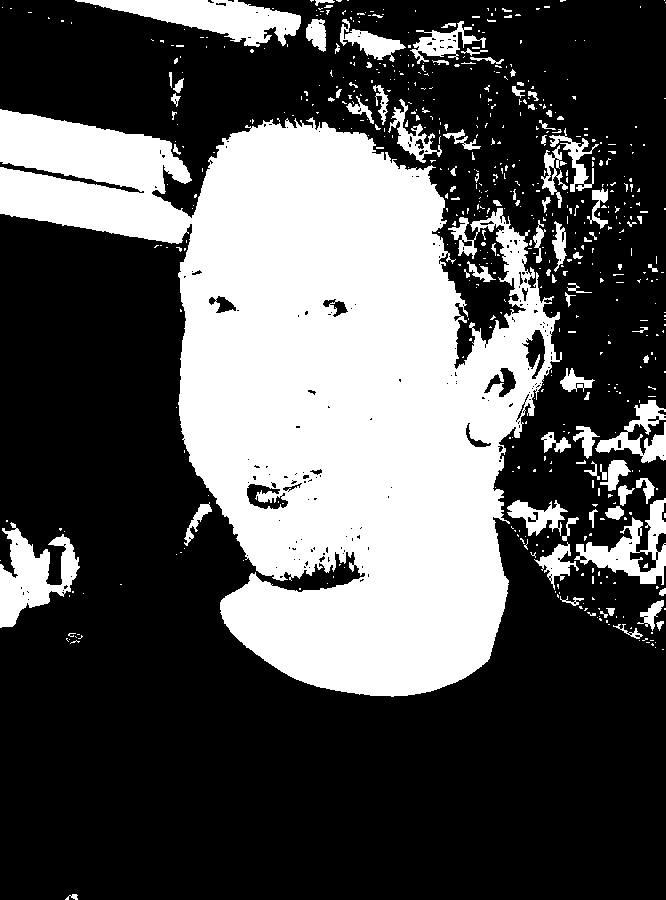
This result selects a chrominance range. It is not a face detector, identity model, or safety-certified human detector.
3. Benchmarking
YCrCb thresholding has no universal checkpoint benchmark. Evaluate the complete deployed pipeline using pixel precision, recall, IoU, connected-component stability, centroid error, and latency. Stratify the results by exposure, skin tone, illuminant, camera, compression, and confusing background material.
Compare RGB, HSV, LAB, and YCrCb on the same frames. A fair comparison holds preprocessing, annotations, spatial filtering, and evaluation metrics constant while allowing each space its own bounds selected only on a tuning split.
4. Where to Go Next?
 Basic · 14 min read
RGB vs HSV vs LAB vs YCrCb
RGB, HSV, LAB, and YCrCb describe the same pixel with different coordinates, making different segmentation problems easier. Learn what each channel means, how the transforms work, and which color space fits a robotics task.
Read tutorial →Basic · 8 min readWhat is HSV Color Segmentation?
HSV color segmentation solves the problem of selecting pixels by color while separating hue from brightness. Learn the RGB-to-HSV mechanism, circular hue thresholds, practical failure modes, and how to use it in the Telekinesis Agentic OS.
Read tutorial →5. References
- ITU-R. “Recommendation BT.601-7: Studio Encoding Parameters of Digital Television”, 2011.
- Kakumanu, P., Makrogiannis, S., and Bourbakis, N. “A Survey of Skin-Color Modeling and Detection Methods”, Pattern Recognition, 2007.
- Telekinesis. “Segment Image Using YCrCb”, Cornea Skill documentation.